> For the complete documentation index, see [llms.txt](https://sunbird.gitbook.io/sunbird-spark/llms.txt). Markdown versions of documentation pages are available by appending `.md` to page URLs; this page is available as [Markdown](https://sunbird.gitbook.io/sunbird-spark/use/developer-guide/sunbird-spark-mobile-app.md).
# Sunbird Spark Mobile App
### Tech Overview
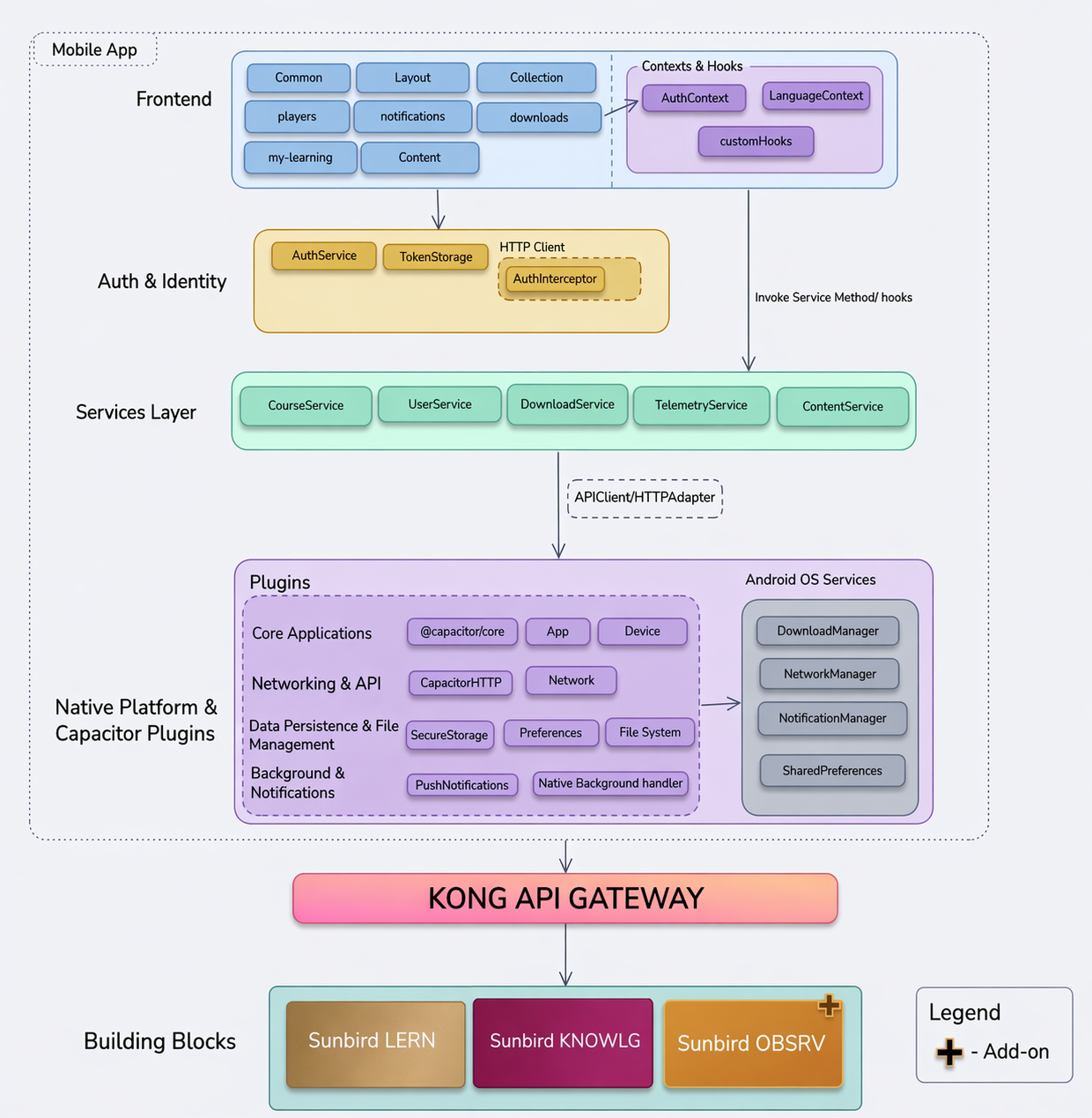
The Spark mobile app is built on React + Ionic 8 with Capacitor 8 as the native bridge. It runs natively on Android (minSdkVersion 26 / Android 8.0).
#### Key Architectural Decisions
* Vite as the build tool - the app uses Vite 7 for fast hot module replacement during web development and faster production builds.
* **Offline-first design** — Content is downloaded as `.ecar` files (content packages) to device filesystem storage, with metadata tracked in SQLite. PDF, Video, ePub, and QuML players can render content from local files without any network connection.
* **Telemetry sync** — Telemetry events are staged in SQLite when offline and synced to the server in batches when connectivity is restored.
* **Multilingual support** — The app ships with translations for English, French, Portuguese, and Arabic. Arabic includes RTL layout support, and language preference is persisted in browser localStorage across sessions.
#### Component Diagram
#### Developer setup
| Layer | Technology | Version |
| ------------- | ------------------------ | ------- |
| UI Framework | Ionic React | 8.x |
| Build Tool | Vite | 7.x |
| Native Bridge | Capacitor | 8.x |
| Language | Language | 5.x |
| Testing | Vitest + Testing Library | - |
### Prerequisites
Before cloning, ensure you have the following installed.
\
All Platforms
| Tools | Version | Notes |
| ------- | ---------- | -------------------------- |
| Node.js | 22.x | 20.x will fail with Vite 7 |
| NPM | 10.x | Comes bundled with Node 22 |
| Git | Any recent | - |
Android Builds only
| Tools | Required Versions |
| -------------- | --------------------------------------------------------- |
| Android Studio | Latest Stable |
| Android SDK | compileSdk 36 (Android 15) |
| JDK | 17+ (required by Gradle 8.11) |
| Gradle | 8.11.1 — managed by the wrapper, no manual install needed |
{% hint style="info" %}
iOS is not currently supported. The ios/ platform has not been added to this project.
{% endhint %}
#### Step 1 — Clone the repository
```
git clone
cd
```
#### Step 2 — Install Dependencies
```
npm install
```
This also runs two postinstall scripts automatically:
* copy-assets.js — copies PDF, Video, ePub, and QuML player assets from `node_modules/@project-sunbird/*` into:
— public/assets/
— public/content/assets/
* scripts/copyContentPlayer.js — assembles @project-sunbird/content-player into:
— public/content-player/
— with any local overrides applied on top
If either script fails, check that all @project-sunbird/\* packages were installed correctly before proceeding.
#### Step 3 — Configure environment variables (Android)
Open `android/gradle.properties` and fill in the required values:
```
base_url=https://your-sunbird-backend.org
mobile_app_consumer=mobile_device
mobile_app_key=
mobile_app_secret=
producer_id=dev.sunbirded
```
These are injected as Android string resources at build time and read at runtime via the `capacitor-read-native-setting` plugin.
The app will not connect to a backend without these values.
#### Step 4 — Add Google Services for push notifications
Place your `google-services.json` file in:
```
android/app
```
The build system checks for this file and applies the Google Services Gradle plugin conditionally.
#### Step 5 — Build and run on Android
```
npm run build && npx cap sync android && cd android && ./gradlew assembleDebug && cd ..
```
| Command | Purpose |
| ----------------------- | ---------------------------------------------------------------- |
| npm run build | Compiles TypeScript and bundles web assets into `dist/` |
| npx cap sync android | Copies `dist/` into the Android project and syncs native plugins |
| ./gradlew assembleDebug | Builds the debug APK |
The output APK will be available at:
```
android/app/build/outputs/apk/debug/app-debug.apk
```
Use `./gradlew clean assembleDebug` only when you suspect stale build artifacts (e.g., after changing native dependencies or syncing new Capacitor plugins).
#### Step 6 - Open in Android Studio
```
npx cap open android
```
Then select a device or emulator and click Run.
---
# Agent Instructions
This documentation is published with GitBook. GitBook is the documentation platform designed so that both humans and AI agents can read, navigate, and reason over technical content effectively. Learn more at gitbook.com.
## Querying This Documentation
If you need additional information that is not directly available in this page, you can query the documentation by asking a question.
Perform an HTTP GET request on the following URL with the `ask` and `goal` query parameters:
```
GET https://sunbird.gitbook.io/sunbird-spark/use/developer-guide/sunbird-spark-mobile-app.md?ask=&goal=
```
`ask` is the immediate question: it should be specific, self-contained, and written in natural language.
`goal` is what the user is ultimately trying to achieve, the reason they need the answer. Sharing it helps GitBook give you a better, more relevant answer. A goal is most helpful when it describes the outcome the user wants rather than restating the question. For example, with `ask=how do I create an API token`, a goal like `automate deployments from our CI pipeline` lets GitBook tailor the answer to that use case.
The response will contain a direct answer to the question and relevant excerpts and sources from the documentation.
Use this mechanism when the answer is not explicitly present in the current page, you need clarification or additional context, or you want to retrieve related documentation sections.